In late December 2023, Konet announced the integration of Gravatar into the client Profile of its Client Area. The change is part of the recent Client Area upgrade, which added new features, improvements, capabilities and services to make your experience easier.
Each new feature or service will be announced separately as soon as it becomes available.
Gravatar integration in your client profile
The user experience is always better when it is personal. We integrated Gravatar so that you can add your own touch to your Profile.
What is Gravatar?
According to the Gravatar website:
“An “avatar” is an image that represents you online, a little picture that appears next to your name when you interact with websites.
A Gravatar is a Globally Recognized Avatar. You upload an image and create your public profile just once, and then when you participate in any Gravatar-enabled site, your Gravatar image and public profile will automatically follow you there.
For example, once your Gravatar account is set up, your image will automatically appear on OpenAI, Slack, WordPress, etc.
Gravatar is a free service for site owners, developers and users, run and supported by Automattic (the company behind WordPress).
Gravatar is already used by tech giants and large organizations such as WordPress, Github, OpenAI, Atlassian, Slack, Disqus and Salesforce.”
How does the Gravatar integration affect me?
With Gravatar integrated into your Profile in the Client Area at billing.konet.gr, an image has been added above your Name.
If you have not linked the email address you use to log in to the Client Area with Gravatar, you will see geometric shapes in your Profile image.
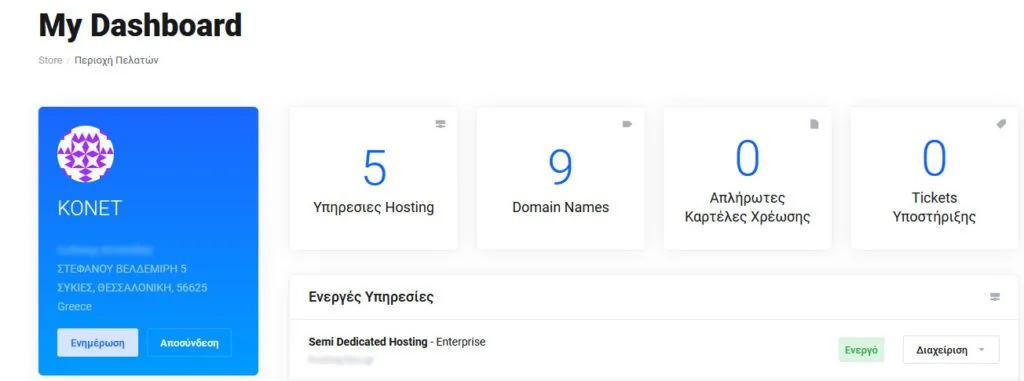
Once you link your email address with Gravatar, you will see the image you upload to Gravatar.
This small but tasteful change will add your own touch to the Client Area.
How do I sign up for Gravatar?
To sign up for Gravatar, simply visit their website at gravatar.com.
There, click the “Sign Up” button and follow the sign-up instructions.
Once sign-up is complete, log in to your new Gravatar Profile and upload the image of your choice.
Gravatar will save your image, and a few hours later you will see it in your account in the Client Area.
If you have any questions about the process, you can follow the instructions for creating a Gravatar account on their website.
We encourage you to make use of the new feature and give the refreshed konet.gr Client Area your own “color”.
Featured Image: Screenshot from Gravatar.com – Edited by Konet
 This article is licensed under Creative Commons Attribution 4.0 International (CC BY 4.0). You may republish it, provided you credit Konet as the source with a link to this article.